In-depth study of SARA
Material
- Computers / Ipads with internet connection
Lesson overview
5 min Introduction (Meeting place)
- Greet everyone.
- Tell us what will happen during today's lesson.
10 min Teacher-led - the grid becomes a chessboard
10 min Students test 2-2
5 min Joint repetition of different commands in kojo
20 min : students make their own chess piece in a kojo
10 min Rounding (Meeting place)
- Repetition of all parts of SARA: sequence, alternative, repetition and abstraction
- Hi then until next week.
Teaching
Distribute computers / Ipads and all students enter the kojo page
- Joint / teacher-led start
- Make sure everyone has the grid code from the previous lesson
- Students draw a grid.
in the previous lesson we build a grid, but it is not a chessboard yet, we need to fill every other box
show the film about some useful commands (fill, penColor, …jumpTo):
Have students test and with the fill function setFillColor(colour)
Start with filling a square with different colours.
def square = {repeat (4) {forward; left}}
setFillColor(black)
square
Discuss together how we can fix the filling of every other box.
def square = {repeat (4) {forward; left}}
setFillColor(black)
square
hop
setFillColor(white)
square
and how to get a bar. Let the students test to solve the problem first on their own.
Discuss some possible solutions. Here is one of them:
def square = repeat (4) {forward; right}
def bar= {repeat (4) {setFillColor (black)
square
hop
setFillColor(white)
square
hop}
}
bar
2) In groups 2-2: the students now end their grid code with the above code for filling and test so that it becomes a chessboard.
Tip: Two different bars are needed.
This is a more advanced exercise. You can give them a part of a code and the students complete the code.
bar 1 starts with a black square, bar 2 starts with a wihte box:
here is the code for bar 1:
def square = repeat (4) {forward; right}
def bar1= {repeat (4) {setFillColor (black)
square
hop
setFillColor(white)
square
hop}
}
Asked the students how to change the code.Here is the code for bar 2:
//def square = repeat (4) {forward; right}
def bar2= {repeat (4) {setFillColor (white)
square
hop
setFillColor(black)
square
hop}
}
Now you can make a chessboard:
def chessboard = {
repeat (4) {
bar1
hop(-200)
right
forward
left
bar 2
hop(-200)
right
forward
left
}}
chessboard
If you want to have it faster choose : setSpeed(fast) at the beginning of your code.
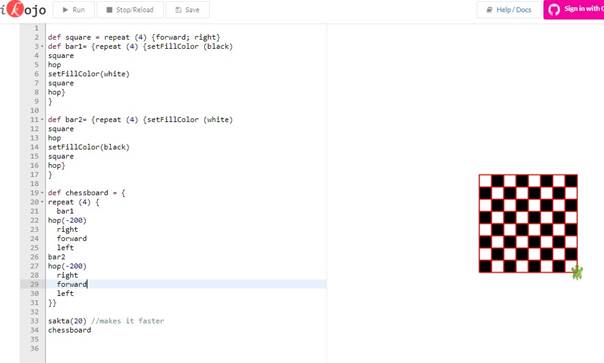
3) Supplements for students who are far ahead: Writing notation
let some students try to figure out how to do the notation code.
But it takes A, B, C,…
With the write function you can fix it!
write("A")
hop
write("B")
hop
write("C")
hop
write("D")
hop
write("E")
hop
write("F")
hop
write("G")
hop
write("H")
hop(-200)
and so it is taken 1,2,3,…
try different ways to do it! Use invisible, then the turtle is not visible and with setPenColor (green) you change the colour of the pen
right
forward
left
write ("1 2 3 4 5 6 7 8") or maybe better with
write ("1 2 3 4 5 6 7 8")
try with different spaces between the numbers to get it right.
4. teacher-ledshow the notation code, discuss in class how to get it right with space between the numbers.
or give the students the code and they try by themselves.
Now we soon have a chessboard and can play! Show the whole program and/or give the code to the students.
setSpeed(fast)
def square = repeat (4) {forward; right}
def bar1 = {
repeat (4) {setFillColor(black)
square
hop
setFillColor(white)
square
hop}
}
def bar2= {
repeat (4) {setFillColor (white)
square
hop
setFillColor(black)
square
hop}
}
def chessboard = {
repeat (4) {
bar1
hop(-200)
right
forward
left
bar2
hop(-200)
right
forward
left
}}
write("A")
hop
write("B")
hop
write("C")
hop
write("D")
hop
write("E")
hop
write("F")
hop
write("G")
hop
write("H")
hop(-200)
setPenColor(noColor)
right
forward
left
setPenColor (red)
write ("1 2 3 4 5 6 7 8")
setPosition (25, -20)
chessboard
Try out to start at the right position for the notation and/or the chessboard. Choose setPosition(-25,25) or a similar one.
Compare the students' results with the commands board and notation.
5) Joint / teacher-led: what commands do we know?Repetition of different commands in kojo
Together with the students, you make a list of different commands:
forward, right, left, backward,
circle (50)
fill (colour)
mm.
You find a list in appendix 1 for this lesson.
5) Group 2-2: each student draws their own chess piece in a kojo.
Encourage students to use all parts of SARA. Encourage the exchange of ideas and especially programming tips.
6) Show some students' results at the end of the lesson.Ask students to present their pieces and look at the code together. Praise the results.
Rounding
When there are five minutes left in the lesson, tell the children to pack up. You gather at Meeting place and the teacher summarizes what the children have learned during the lesson.
5 min Rounding (Meeting place)● Repeat all concepts in SARA
● Everyone does the sequence together:
stand - repeat (4) {jump; spin} - "Hello then" - jump - "thank you for today" - if (black shoes) wave otherwise {jump} - sit
● Hi then until next week.

