A LTERNATIVE and R epetition (S AR A)
A LTERNATIVE and R epetition (S AR A)
Programming "Unplugged - Alternative and Repetition"
Objectives of the lesson: A and R– in SARA
Preparations Material
- command card (sit, stand, jump, spin, wave, "Hello", “Hello then thank you for today", if (….) {……} else {…}, repeat (….) {….}, card with 2 , 3,4,5,6,7,)
- paper and pencils
- Material: many cards with forward, back, right and left
- Worksheets with different sequences (see appendix)
- Chessboard
Copying
- copy a large number of command cards (20 each, more depending on group size)
- copy up worksheets
Lesson overview
5 min Introduction (Meeting place)
- Greet everyone.
- Tell us what will happen during today's lesson.
10 min Introduction of the concept of alternative
- What do alternatives mean?
Some examples of alternatives (black shoes, blue shirt,…)
15 min Exercises with Alternatives
How do we move on the chessboard? Teacher-led / worksheet
Give commands to the rook on the chessboard where there are obstacles, (if (square occupied) {right} else{forward}
5 min Introduction to the concept of repetition
what does repetition mean Some examples of repetition
20 min exercises with repetition
How do we move on the chessboard? Simplify your program with repeat (…) Worksheet on repetition
5 min Rounding (Meeting place)
Repeat the concept of alternative and repetition
- everyone does the sequence together:
stand - repeat (4) {jump; spin} - "Hello then" - jump - "thank you for today" - if (black shoes) {wave} else{jump} - sit
- Hi then until next week.
Leader's page
Teaching1) Teacher-led:
Start with - what do alternatives mean? Mention some optional examples of when you need to choose between two options.
Explain the command:
if (conditions)
{command1}
else
{command2}
Using the example:
if (black shoes)
{spin}
else
{jump}
A first program: the teacher lays out: (taped on the board, wall, projector) stand
if (black shoes)
{spin}
else
{jump}
wave
"Hello"
sit
repeat the program with the students, replace black shoes with for example (blue shirt) and in the second step {spin} with {"hello"}
The students perform the movements.
2) How do we move on the chessboard? teacher-ledMaterial: Chessboard with coordinates, chess piece rook, obstacles (eg other chess pieces) (Large chessboard on the floor, or regular chessboard or copy of a chessboard on a paper) The same exercise as before but with different obstacles on the chessboard.
The rook should move from a starting position to an end position.
But: The rook can only move forward until it hits an obstacle, or the chessboard is finished. Then it can either do right or left rotation
if (the square in front is free)
{forward}
else
{right}
|
|
|
|
|
|
|
|
|
|
|
O |
|
|
|
|
O |
|
|
|
|
|
|
|
|
|
|
|
O |
|
|
|
|
|
|
|
|
|
|
|
O |
|
|
|
|
|
|
|
|
|
|
|
|
|
|
|
|
|
|
|
|
|
O |
|
Sta rt |
|
|
|
|
|
|
|
mission: starting square for the rook is A1, starting with advancing until the first obstacle
If you hit an obstacle, you must use the command right
Draw the path of the rook, discuss in each step which option to choose and write down how the rook goes. mark in colour which option is used. ( forward : green, right : blue)
Solution: forward ; forward ; forward ; right ; forward ; forward ; right ; forward ; forward ; forward ; right , forward ; forward ; right ;…
What happens? We end up in a loop. The rook moves the same way over and over again.
For a better understanding of programming::
Enter the code with the command
if (the square in front is free)
{forward}
else
{right}
And mark in colour which option is selected:
Distribute the following worksheet in which students mark which option is selected
worksheet:
And mark in colour which option is selected:
startposition A1 ( or any other startposition for more training)
if (the square in front is free)
{forward} else
{right}
if (the square in front is free)
{forward} else
{right}
if (the square in front is free)
{forward} else
{right}
if (the square in front is free)
{forward} else
{right}
if (the square in front is free)
{forward} else
{right}
if (the square in front is free)
{forward} else
{right}
if (the square in front is free)
{forward} else
{right}
if (the square in front is free)
{forward} else
{right}
if (the square in front is free)
{forward} else
{right}
if (the square in front is free)
{forward} else
{right}
if (the square in front is free)
{forward} else
{right}
if (the square in front is free)
{forward} else
{right}
if (the square in front is free)
{forward} else
{right}
3) Worksheets work 2-2 (distribute CGS 8 workingsheet alternativ )
The starting square is B1, the same obstacle, draw the road and note the road for the rook, stop when you end up on A1
|
|
|
|
|
|
|
|
|
|
|
O |
|
|
|
|
O |
|
|
|
|
|
|
|
|
|
|
|
O |
|
|
|
|
|
|
|
|
|
|
|
O |
|
|
|
|
|
|
|
|
|
|
|
|
|
|
|
|
|
|
|
|
|
O |
|
|
Start |
|
|
|
|
|
|
Solution:
forward; forward; forward; forward; forward; right ; forward; forward; forward; forward; forward; for ward; right ; forward; forward; forward; right ; forward; forward; forward; forward; forward; forward; forward; right ; forward; right ; forward; forward; right ; forward; forward; forward;
addition: same exercise but the rook's alternative is left instead of right: if (the square in front is free)
{forward} else
{left}
The result will be completely different.
Additional exercise:
Assignment 3:
Now you can play against another player. Rooks T1 and T2 will change places. Are you going to crash?
Play 1 begins with the first move. Same rules as above. Draw your path and write down your code.
|
|
|
|
|
|
|
T 2 |
|
|
|
|
|
|
|
|
|
|
|
|
|
|
|
|
|
|
|
|
O |
|
|
|
|
|
|
O |
|
|
|
|
O |
|
|
|
|
|
|
|
|
|
|
|
|
|
|
|
|
|
|
|
|
|
O |
|
|
T 1 |
|
|
|
|
|
|
3) R in SARA
Repeat. When the same command is to be used several times, it may be a good idea to use a new command: repeat (number) {command}
forward; forward; forward then becomes:
repeat (3) {forward}
Distribute worksheet repetition ( CGS 8 workingsheet repetiton ) where students can fill in the solution.
simplify the code using the repeat command: (if the chessboard is to be used in parallel: select B1 as starting square) (It is the same code as before during the lesson)
forward; forward; forward; forward; forward; right ; forward; forward; forward; forward; forward; for ward; right ; forward; forward; forward; right ; forward; forward; forward; forward; forward; forward; forward; right ; forward; right ; forward; forward; right ; forward; forward; forward;
solution:
repeat (5) {forward} right
repeat (6) {forward} right
repeat (3) {forward} right
repeat (7) {forward} right
forward right
repeat (2) {forward} right
repeat (3) {forward}
the end position becomes C1
4)
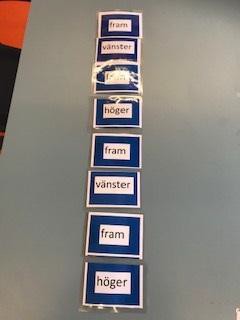 |
Use the cards and add a code to a staircase. Solution example:
Use repeat commands and rewrite the program, repeat (2) {forward; left; forward; right}
what will be the code for a staircase with 25 steps?
Back to the chessboard:
Exercise: The starting position for the rook is B2. What is the end position? right
repeat (3) {forward}
left
repeat (4) {forward} right
rear
repeat (3) {forward; right} forward
Draw the path of the rook on the chessboard, at the same time it can be done on a chessboard.
|
|
|
|
|
|
|
|
|
|
|
|
|
|
|
|
|
|
|
|
|
|
|
|
|
|
|
|
|
|
|
|
|
|
|
|
|
|
|
|
|
|
|
|
|
|
|
|
|
|
|
|
|
|
|
|
Star t |
|
|
|
|
|
|
|
|
|
|
|
|
|
|
|
Use the repeat command to move the rook on the chessboard.
The rook will go from A1 to H7. Use front, right, left and repeat. Obstacles should be avoided.
One possible solution: right
repeat (7) {forward} left
repeat (6) {forward}
|
|
|
|
|
|
|
|
|
|
|
O |
|
|
|
|
O |
|
|
|
|
|
|
|
|
|
|
|
O |
|
|
|
|
|
|
|
|
|
|
|
O |
|
|
|
|
|
|
|
|
|
|
|
|
|
|
|
|
|
|
|
|
|
|
|
Start |
|
|
|
|
|
|
|
Rounding
When there are five minutes left in the lesson, tell the children to pack up and put everything in respective box. You gather at the Meeting Place and the teacher summarizes what the children have learned during the lesson.
5 min Rounding (Meeting place)
▪ Repeat the concept of alternative and repetition
▪ Everyone does the sequence together:
stand - repeat (4) {jump; spin} - "Hello then" - jump - "thank you for today" - if (black shoes) wave otherwise {jump} - sit
Hi then until next week.

